How to Set Up a Kafka Cluster with KRaft Architecture (Step-by-Step)

KRaft Is the New Default - Here's Why It Matters
Apache Kafka ran on ZooKeeper for nearly a decade. ZooKeeper managed cluster metadata: which brokers are alive, who holds which partition leader, and what the controller node is. It worked - but it also introduced a second distributed system to deploy, secure, monitor, and upgrade alongside Kafka itself.
KRaft (Kafka Raft) changes all of that. Introduced in KIP-500 and production-ready since Kafka 3.3, KRaft moves metadata management directly into Kafka. A subset of brokers are designated as controllers and use the Raft consensus algorithm to make authoritative decisions about cluster state - no ZooKeeper required.
As of Kafka 3.5, ZooKeeper is officially deprecated and is no longer recommended for new deployments. Its full removal is planned for Kafka 4.0. If you're starting a new cluster today, KRaft is the right choice - it is fully supported, actively developed, and the only path forward.
This guide walks you through building a 3-node Kafka KRaft cluster from scratch on Linux, covering every configuration detail needed for a production-ready deployment.
Architecture Overview
A KRaft cluster assigns each Kafka process one or more roles:
- controlle - participates in the Raft quorum, stores and replicates the cluster metadata log.
- broker - handles producer/consumer connections, stores topic partition data.
- combined - runs both roles on the same JVM process (suitable for development or small clusters).
For production, the recommended topology is separated roles: dedicated controller nodes form the quorum, and broker nodes handle data.
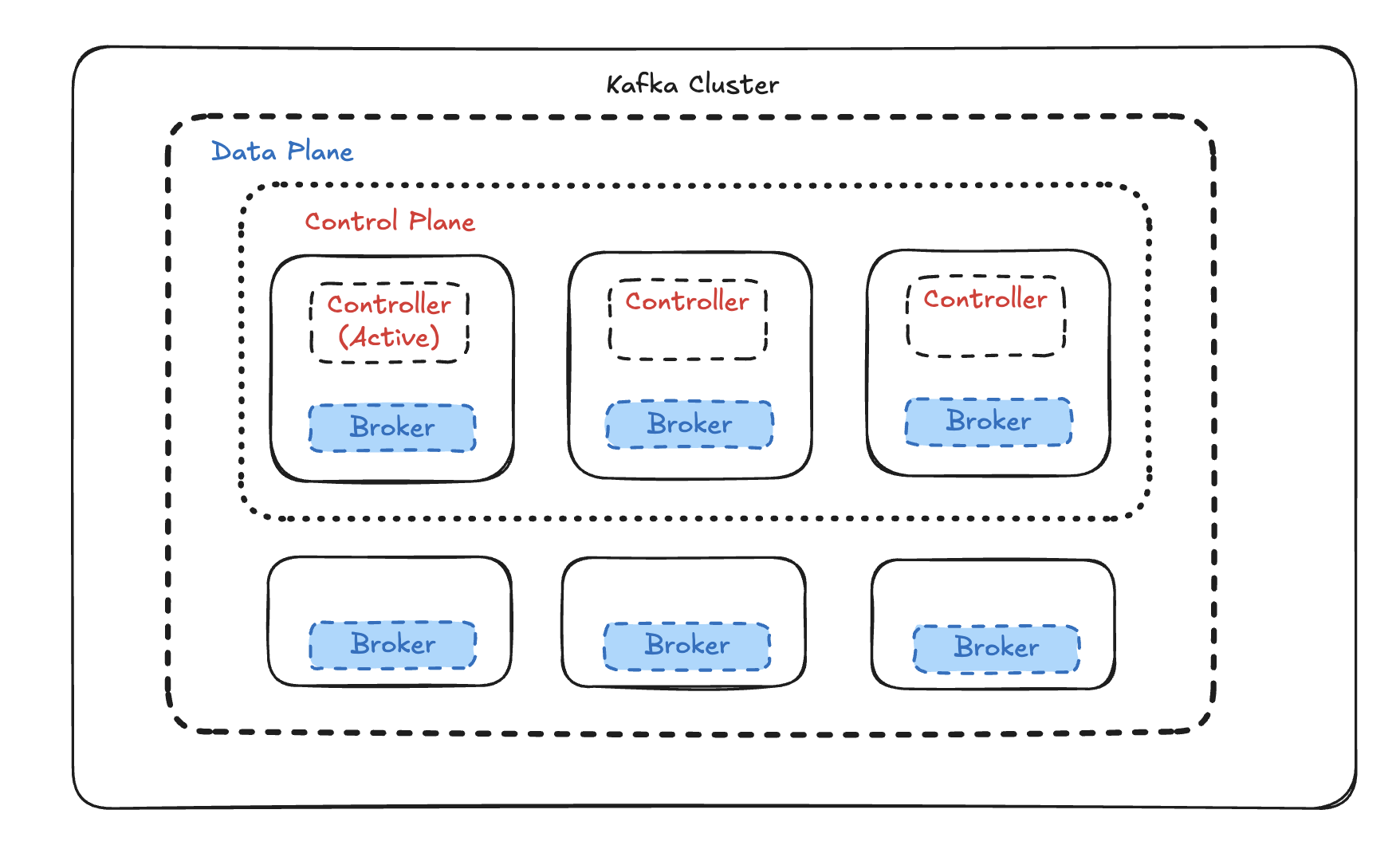
In this guide we'll deploy 3 combined-mode nodes (controller + broker on each) using Docker Compose - the fastest way to get a full Raft quorum and replication factor 3 running locally or in a staging environment, without installing Java, managing systemd units, or formatting storage manually.
Prerequisites
| Requirement | Version |
|---|---|
| Docker | 24.0+ |
| Docker Compose | v2.20+ (plugin) |
| RAM available to Docker | 6 GB minimum, 8 GB recommended |
| Disk | 10 GB free |
Verify your setup:
docker --version        # Docker version 24.x or later
docker compose version  # Docker Compose version v2.x or later
Project Structure
Create a working directory:
mkdir kafka-kraft && cd kafka-kraft
Step 1: Generate a Cluster UUID
Every KRaft cluster is bound to a single, unique UUID embedded in each broker's metadata log. All three brokers must share the same UUID - mismatched UUIDs prevent quorum from forming.
Generate one using the official Kafka Docker image:
docker run --rm apache/kafka:3.8.0 \
  /opt/kafka/bin/kafka-storage.sh random-uuid
Example output:
MkU3OEVBNTcwNTJENDM2Qg
Save this value - you'll use it in the next step.
Never reuse a UUID across separate clusters, and never regenerate the UUID on an existing cluster - doing so corrupts the metadata log.
Step 2: Create the Environment File
Create a .env file in your project root. Docker Compose automatically loads it:
# .env
# Paste the UUID generated in Step 1
KAFKA_CLUSTER_ID=MkU3OEVBNTcwNTJENDM2Qg
Using .env centralises the cluster ID and makes it trivial to change or override in CI.
Step 3: Write the Docker Compose File
Create docker-compose.yml:
networks:
  kafka-net:
    driver: bridge

volumes:
  kafka-1-data:
  kafka-2-data:
  kafka-3-data:

x-kafka-common: &kafka-common
  image: apache/kafka:3.8.0
  restart: on-failure
  networks:
    - kafka-net

services:
  kafka-1:
    <<: *kafka-common
    container_name: kafka-1
    ports:
      - "9092:9092"
    environment:
      KAFKA_NODE_ID: 1
      KAFKA_PROCESS_ROLES: broker,controller
      KAFKA_LISTENERS: PLAINTEXT://0.0.0.0:9092,CONTROLLER://0.0.0.0:9093
      KAFKA_ADVERTISED_LISTENERS: PLAINTEXT://kafka-1:9092
      KAFKA_CONTROLLER_LISTENER_NAMES: CONTROLLER
      KAFKA_INTER_BROKER_LISTENER_NAME: PLAINTEXT
      KAFKA_LISTENER_SECURITY_PROTOCOL_MAP: CONTROLLER:PLAINTEXT,PLAINTEXT:PLAINTEXT
      KAFKA_CONTROLLER_QUORUM_VOTERS: 1@kafka-1:9093,2@kafka-2:9093,3@kafka-3:9093
      CLUSTER_ID: ${KAFKA_CLUSTER_ID}
      # Replication
      KAFKA_OFFSETS_TOPIC_REPLICATION_FACTOR: 3
      KAFKA_TRANSACTION_STATE_LOG_REPLICATION_FACTOR: 3
      KAFKA_TRANSACTION_STATE_LOG_MIN_ISR: 2
      KAFKA_DEFAULT_REPLICATION_FACTOR: 3
      KAFKA_MIN_INSYNC_REPLICAS: 2
      KAFKA_NUM_PARTITIONS: 6
      # Retention
      KAFKA_LOG_RETENTION_HOURS: 168
      KAFKA_LOG_SEGMENT_BYTES: 1073741824
      # JVM
      KAFKA_HEAP_OPTS: "-Xmx2g -Xms2g"
    volumes:
      - kafka-1-data:/var/lib/kafka/data

  kafka-2:
    <<: *kafka-common
    container_name: kafka-2
    ports:
      - "9094:9092"
    environment:
      KAFKA_NODE_ID: 2
      KAFKA_PROCESS_ROLES: broker,controller
      KAFKA_LISTENERS: PLAINTEXT://0.0.0.0:9092,CONTROLLER://0.0.0.0:9093
      KAFKA_ADVERTISED_LISTENERS: PLAINTEXT://kafka-2:9092
      KAFKA_CONTROLLER_LISTENER_NAMES: CONTROLLER
      KAFKA_INTER_BROKER_LISTENER_NAME: PLAINTEXT
      KAFKA_LISTENER_SECURITY_PROTOCOL_MAP: CONTROLLER:PLAINTEXT,PLAINTEXT:PLAINTEXT
      KAFKA_CONTROLLER_QUORUM_VOTERS: 1@kafka-1:9093,2@kafka-2:9093,3@kafka-3:9093
      CLUSTER_ID: ${KAFKA_CLUSTER_ID}
      KAFKA_OFFSETS_TOPIC_REPLICATION_FACTOR: 3
      KAFKA_TRANSACTION_STATE_LOG_REPLICATION_FACTOR: 3
      KAFKA_TRANSACTION_STATE_LOG_MIN_ISR: 2
      KAFKA_DEFAULT_REPLICATION_FACTOR: 3
      KAFKA_MIN_INSYNC_REPLICAS: 2
      KAFKA_NUM_PARTITIONS: 6
      KAFKA_LOG_RETENTION_HOURS: 168
      KAFKA_LOG_SEGMENT_BYTES: 1073741824
      KAFKA_HEAP_OPTS: "-Xmx2g -Xms2g"
    volumes:
      - kafka-2-data:/var/lib/kafka/data

  kafka-3:
    <<: *kafka-common
    container_name: kafka-3
    ports:
      - "9096:9092"
    environment:
      KAFKA_NODE_ID: 3
      KAFKA_PROCESS_ROLES: broker,controller
      KAFKA_LISTENERS: PLAINTEXT://0.0.0.0:9092,CONTROLLER://0.0.0.0:9093
      KAFKA_ADVERTISED_LISTENERS: PLAINTEXT://kafka-3:9092
      KAFKA_CONTROLLER_LISTENER_NAMES: CONTROLLER
      KAFKA_INTER_BROKER_LISTENER_NAME: PLAINTEXT
      KAFKA_LISTENER_SECURITY_PROTOCOL_MAP: CONTROLLER:PLAINTEXT,PLAINTEXT:PLAINTEXT
      KAFKA_CONTROLLER_QUORUM_VOTERS: 1@kafka-1:9093,2@kafka-2:9093,3@kafka-3:9093
      CLUSTER_ID: ${KAFKA_CLUSTER_ID}
      KAFKA_OFFSETS_TOPIC_REPLICATION_FACTOR: 3
      KAFKA_TRANSACTION_STATE_LOG_REPLICATION_FACTOR: 3
      KAFKA_TRANSACTION_STATE_LOG_MIN_ISR: 2
      KAFKA_DEFAULT_REPLICATION_FACTOR: 3
      KAFKA_MIN_INSYNC_REPLICAS: 2
      KAFKA_NUM_PARTITIONS: 6
      KAFKA_LOG_RETENTION_HOURS: 168
      KAFKA_LOG_SEGMENT_BYTES: 1073741824
      KAFKA_HEAP_OPTS: "-Xmx2g -Xms2g"
    volumes:
      - kafka-3-data:/var/lib/kafka/data
Key configuration notes:
KAFKA_PROCESS_ROLES: broker,controller- each container runs both roles (combined mode), giving you 3 voters in the Raft quorum.KAFKA_CONTROLLER_QUORUM_VOTERS- lists all three controller nodes. This must be identical across all containers.CLUSTER_ID- injected from.env. Theapache/kafkaimage automatically runskafka-storage.sh formaton first startup if the data directory is empty.- Port mapping:
9092,9094,9096on the host expose each broker for external client access. - Named volumes (
kafka-1-dataetc.) persist data across container restarts. x-kafka-commonis a YAML anchor that collapses sharedimage,restart, andnetworksfields across all services.
Step 4: Start the Cluster
docker compose up -d
Docker Compose pulls the image (first run only), creates the network and volumes, then starts all three containers simultaneously. The apache/kafka image detects an empty data volume on first boot and automatically calls kafka-storage.sh format - no manual formatting required.
Check that all containers are running:
docker compose ps
NAME      IMAGE                COMMAND                  STATUS         PORTS
kafka-1   apache/kafka:3.8.0   "/__cacert_entrypoin..."   Up 30 seconds  0.0.0.0:9092->9092/tcp
kafka-2   apache/kafka:3.8.0   "/__cacert_entrypoin..."   Up 30 seconds  0.0.0.0:9094->9092/tcp
kafka-3   apache/kafka:3.8.0   "/__cacert_entrypoin..."   Up 30 seconds  0.0.0.0:9096->9092/tcp
Follow logs to confirm the Raft leader election:
docker compose logs -f

# Look for lines like:
# kafka-1  | [Controller 1] Raft leader election succeeded.
# kafka-2  | [BrokerServer id=2] Registered broker with the controller.
# kafka-3  | [BrokerServer id=3] Registered broker with the controller.
All three brokers should register within a few seconds of each other.
Step 5: Verify the Cluster
Run Kafka CLI tools directly inside a container using docker exec:
Check quorum status
docker exec kafka-1 \
  /opt/kafka/bin/kafka-metadata-quorum.sh \
  --bootstrap-server kafka-1:9092 \
  describe --status
ClusterId:              MkU3OEVBNTcwNTJENDM2Qg
LeaderId:               1
LeaderEpoch:            5
HighWatermark:          8312
MaxFollowerLag:         0
MaxFollowerLagTimeMs:   127
CurrentVoters:          [1, 2, 3]
CurrentObservers:       []
All three node IDs must appear in CurrentVoters. MaxFollowerLag: 0 confirms all controllers are fully caught up.
Create a test topic
docker exec kafka-1 \
  /opt/kafka/bin/kafka-topics.sh \
  --bootstrap-server kafka-1:9092 \
  --create \
  --topic test-events \
  --partitions 6 \
  --replication-factor 3
Verify partition distribution
docker exec kafka-1 \
  /opt/kafka/bin/kafka-topics.sh \
  --bootstrap-server kafka-1:9092 \
  --describe \
  --topic test-events
Topic: test-events  Partitions: 6  ReplicationFactor: 3
  Partition: 0  Leader: 1  Replicas: 1,2,3  Isr: 1,2,3
  Partition: 1  Leader: 2  Replicas: 2,3,1  Isr: 2,3,1
  Partition: 2  Leader: 3  Replicas: 3,1,2  Isr: 3,1,2
  ...
Isr must equal Replicas for all partitions. Any discrepancy means a broker has fallen behind - check its logs immediately.
Send and receive messages
# Produce
echo "hello kraft" | docker exec -i kafka-1 \
  /opt/kafka/bin/kafka-console-producer.sh \
  --bootstrap-server kafka-1:9092 \
  --topic test-events

# Consume (Ctrl+C to exit)
docker exec kafka-1 \
  /opt/kafka/bin/kafka-console-consumer.sh \
  --bootstrap-server kafka-1:9092 \
  --topic test-events \
  --from-beginning
Step 6: Connecting External Clients
From your host machine, clients connect via the mapped ports.
For applications running outside Docker, use localhost with the host-mapped ports:
# Producer / Consumer client config (external to Docker)
bootstrap.servers=localhost:9092,localhost:9094,localhost:9096
For applications running inside the same Docker network (e.g., another Compose service), use the container names directly:
# Client config (inside Docker network kafka-net)
bootstrap.servers=kafka-1:9092,kafka-2:9092,kafka-3:9092
To join an external Compose service to the cluster network, declare the network as external:
# In your other service's docker-compose.yml
networks:
  kafka-net:
    external: true
Skip the Setup: Create a Kafka Cluster in Minutes with Dataverses
Everything you just read - the Compose file, UUID generation, quorum wiring, and even SASL/TLS configuration, or JVM tuning - Dataverses does automatically, in under 5 minutes, with a single click.
Dataverses includes a fully managed, KRaft-native Kafka service built directly into the platform. Here's what you get without writing a single config file:
One-Click Cluster Provisioning
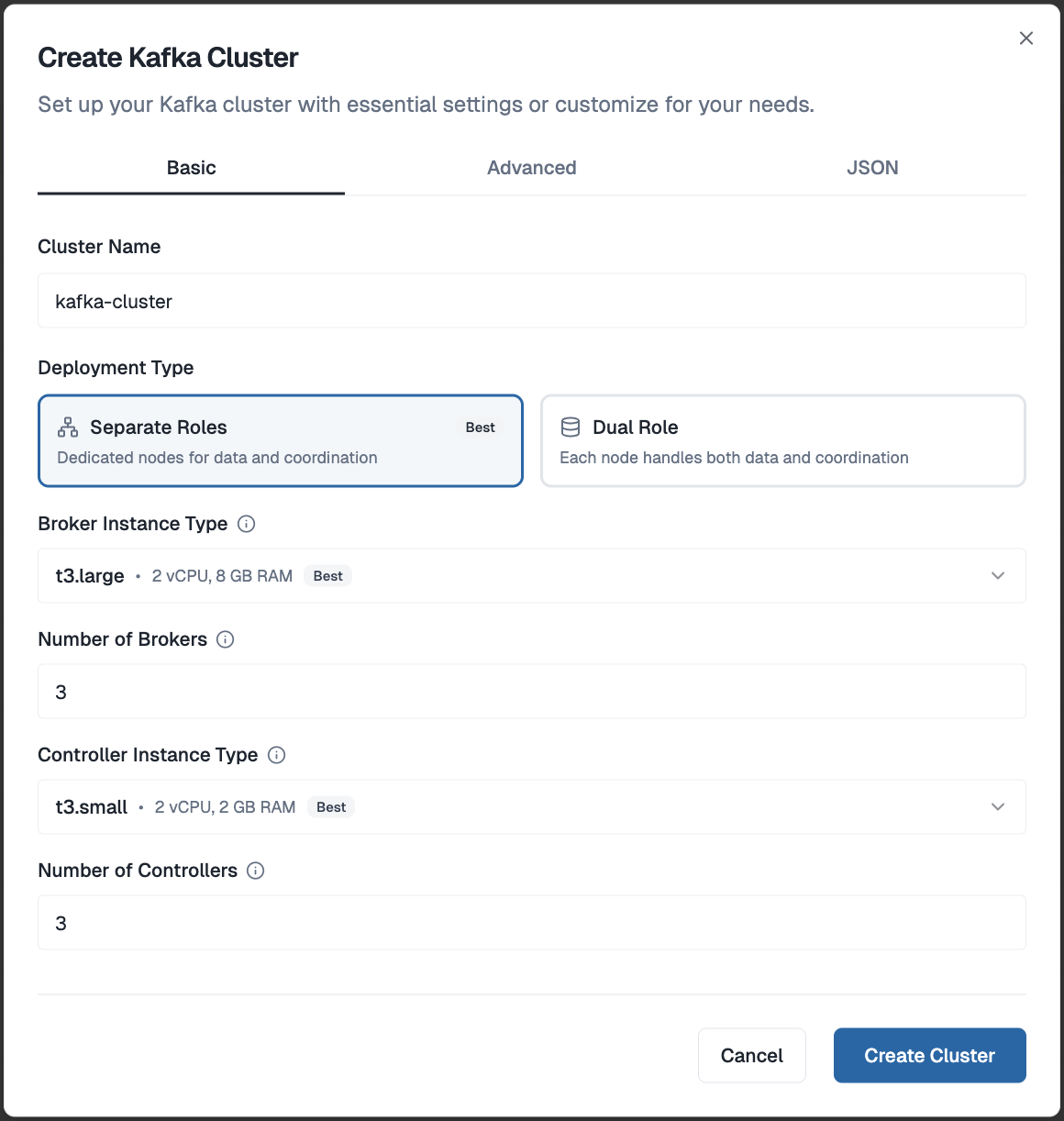
From your Dataverses workspace, open the Create Kafka Cluster dialog. Give your cluster a name, choose between Separate Roles (dedicated broker and controller nodes - recommended for production) or Dual Role (combined nodes - great for dev and staging), set your broker and controller counts, and hit Create Cluster. That's it. No UUID generation, no quorum wiring, no config files - Dataverses handles all of that under the hood and has your cluster ready in minutes.
Visual Topic Management
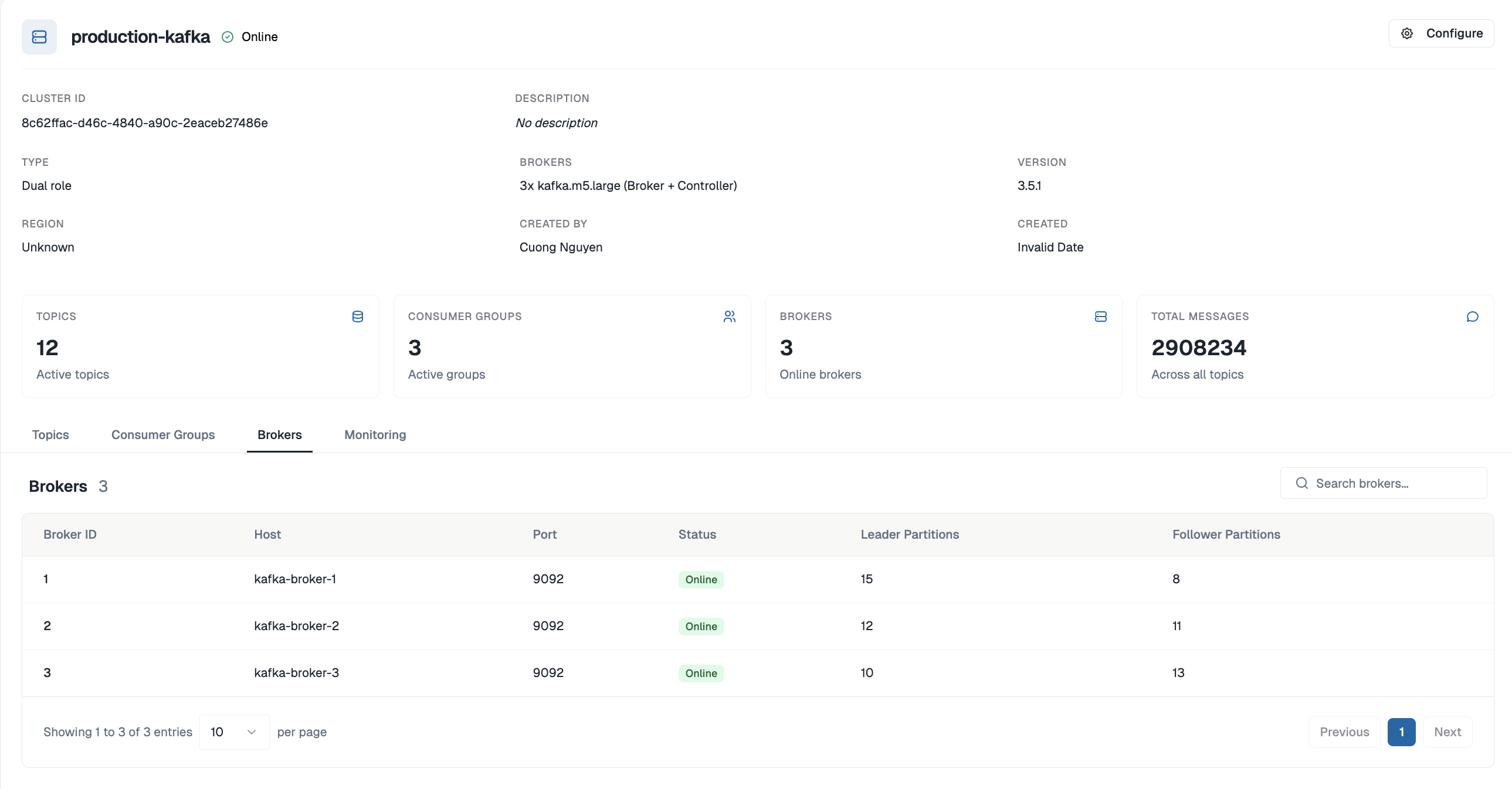
No more kafka-topics.sh. Create, configure, and delete topics through a clean UI. Set partition counts, replication factors, retention policies, and cleanup strategies with a form - not a terminal command. Every change is audited.
Built-In Monitoring
Consumer group lag, broker throughput, under-replicated partitions, disk utilization - all visible in the same Dataverses dashboard where you manage your data pipelines. No Prometheus, no Grafana, no JMX exporters to configure.
Integrated Data Pipelines
Kafka in Dataverses isn't an isolated service - it's a first-class building block in your workflows:
- Connect source databases via CDC ingestion to stream changes directly into Kafka topics
- Chain Kafka topics with Spark transformation clusters in the Workflow Builder
- Write processed results to the Iceberg data lakehouse for real-time analytics
- Query live and historical data through Seraphis Agent in natural language
All within one platform, zero external tools.
Docker Compose is a great way to understand how KRaft clusters fit together. But when you're building a real data product, your time is better spent on the pipelines, transformations, and insights - not on writing YAML and debugging quorum elections.
Start your free Dataverses trial → and have a production-grade KRaft Kafka cluster running before you finish your coffee.
Tags
Keep up with us
Get the latest updates on data engineering and AI delivered to your inbox.
Contents in this story
Recommended for you
Code Smarter, Not Harder: Meet the New Notebook Code Generation on Dataverses
May 23, 2026 · 4 min read
Apache Iceberg 1.11.0 Release: Deletion Vectors, Variant Type, and V3 Maturity
May 22, 2026 · 7 min read
Spark Declarative Pipelines in Apache Spark 4.1: A Complete Guide
May 1, 2026 · 7 min read